Quick Start: Cloud Native Feature-Flagging with the OpenFeature Operator
In the following tutorial, we'll see how to leverage flagd and the OpenFeature Operator to enable cloud-native, self-hosted feature flags in your Kubernetes cluster. flagd is a "feature flag daemon with a Unix philosophy". Put another way, it's a small, self-contained binary that evaluates feature flags, uses standard interfaces, and runs just about anywhere. It can be deployed in a central location serving multiple clients or embedded into a unit of deployment (such as a pod in Kubernetes). The OpenFeature Operator is a K8s-flavored solution for easily adding flagd to any relevant workloads. The operator parses Kubernetes spec files and adds flagd and associated objects to the workloads based on annotations and custom resource definitions it understands. The injected flagd sidecar then gets its feature flags by querying the Kubernetes API for our flags.
Note
This deployment pattern (injecting flagd as a sidecar which communicates with the kubernetes API directly) is the simplest to configure, but it may not be the right solution for all use-cases. See the advanced tutorial for alternative models.
Let's do it
Prerequisites
- If you don't have access to an existing K8s cluster, you have a few options:
- kind is similar to minikube (another solution for running a cluster locally you may be familiar with) but supports more than one node, so it makes for a slightly more realistic experience. If using kind, this tutorial provides a 3-node cluster definition with a forwarded containerPort for you (more on that later).
- MicroK8s and K3s are easily installable Kubernetes clusters you can use locally.
The benefit of these is that they are basically identical to a production environment.
Configuration of
MicroK8sandK3sis out of the scope of this tutorial.
- kubectl
- k9s (optional, if you'd like to inspect your cluster visually)
- helm (optional, if you prefer to install the operator using the Helm chart)
Note
If not using kind, you will have to handle forwarding ports and exposing ingresses however appropriate for your distribution or infrastructure.
Show me the commands
Building our cluster
OK, let's get our cluster up and running!
We recommend using kind for this demo, but if you already have a K8s cluster, you can skip to Install cert-manager.
Using Kind
Download the cluster definition file, kind-cluster-quick-start.yaml:
curl -sfL curl -sfL https://raw.githubusercontent.com/open-feature/openfeature.dev/main/static/samples/kind-cluster-quick-start.yaml > kind-cluster-quick-start.yaml
Then, create our cluster using the kind-cluster-quick-start.yaml file:
kind create cluster --config kind-cluster-quick-start.yaml
This might take a minute or two.
Install cert-manager
Next, because our operator makes use of webhooks, we need some certificate infrastructure in our cluster. If your cluster already has cert manager, or you're using another solution for certificate management, you can go to Install OpenFeature operator.
Install cert-manager, and wait for it to be ready:
kubectl apply -f https://github.com/cert-manager/cert-manager/releases/download/v1.13.2/cert-manager.yaml && \
kubectl wait --timeout=60s --for condition=Available=True deploy --all -n 'cert-manager'
Install OpenFeature operator
And finally, let's install the operator itself:
Install using manifest
kubectl apply -f https://github.com/open-feature/open-feature-operator/releases/download/v0.6.0/release.yaml && \
kubectl wait --timeout=60s --for condition=Available=True deploy --all -n 'open-feature-operator-system'
Install using Helm
helm repo add openfeature https://open-feature.github.io/open-feature-operator/ && \
helm repo update && \
helm upgrade --install open-feature-operator openfeature/open-feature-operator
Note
When using Helm, various configuration parameters can be set, such as resource limits and default configuration values. See the full chart documentation for details.
Downloading assets
Download the file defining our demo deployment, service and custom resource (CRs), end-to-end.yaml:
curl -sfL curl -sfL https://raw.githubusercontent.com/open-feature/playground/main/config/k8s/end-to-end.yaml > end-to-end.yaml
Deploy our workload
Now that the operator is ready to go, we can deploy our workload: (example below deploys into K8s default namespace, update accordingly to other namespace)
kubectl -n default apply -f end-to-end.yaml && \
kubectl wait --timeout=60s deployment --for condition=Available=True -l 'app=open-feature-demo' -n 'default'
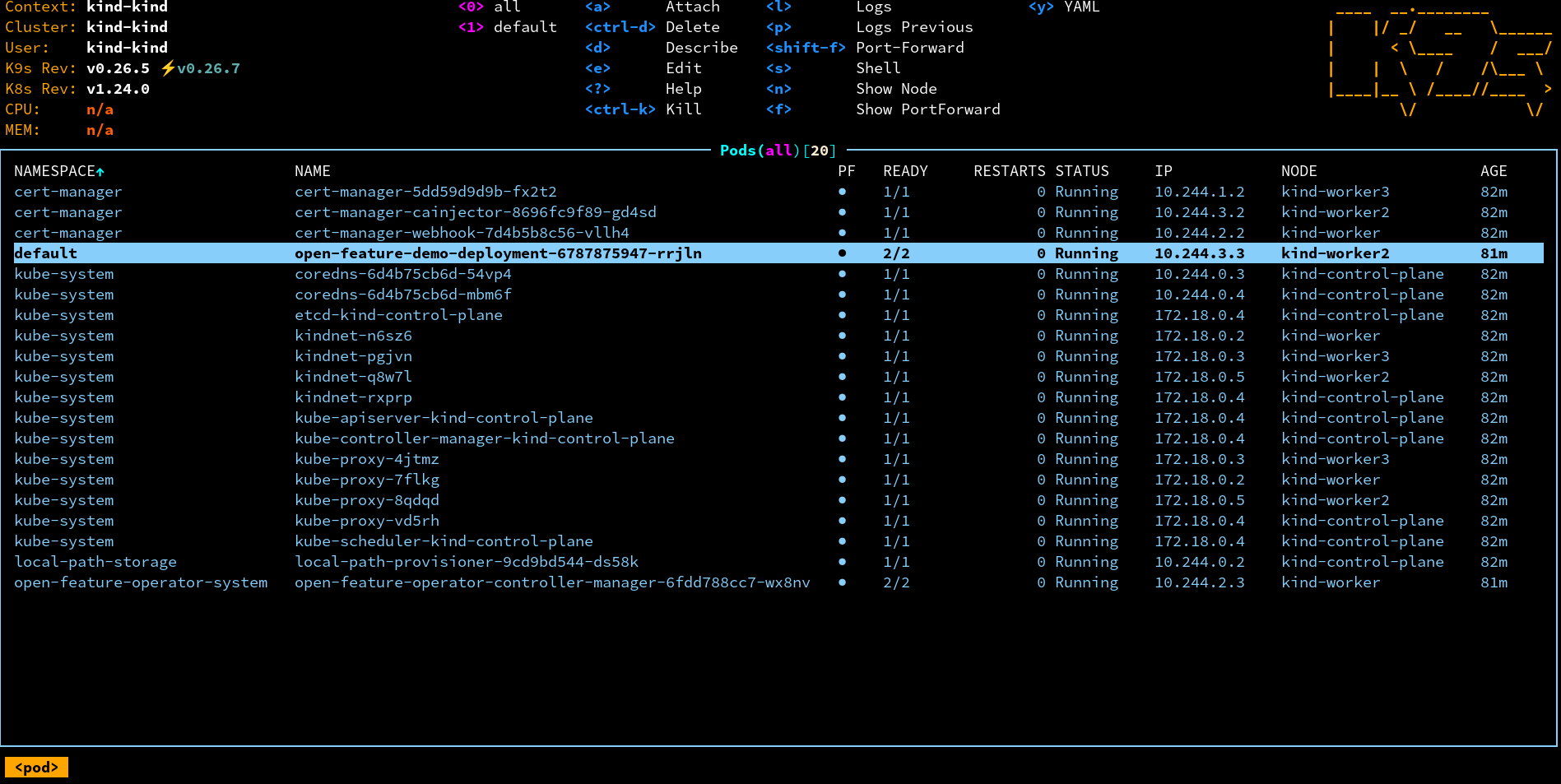
If you're using k9s or some other means of visualization, your cluster should look something like this:
Forward the service (if not using kind)
⚠️ If you're using the supplied kind config, you can skip to Experiment with OpenFeature, the ports are already forwarded.
Forward the app service port:
kubectl port-forward svc/open-feature-demo-app-service -n default 30000:30000
Forward the UI flag evaluation service port:
kubectl port-forward svc/open-feature-demo-ui-service -n default 30002:30002
Experiment with OpenFeature
Now you should see our fictional app at http://localhost:30000
For this demo, we get flag definitions from the custom resource (CRs) you applied to K8s above (end-to-end.yaml).
The resource type is FeatureFlag and there are two instances defined: one is called ui-flags (for the front-end) and one called app-flags
(for the back end).
Below, you'll see how you can modify these instances to change your feature flags.
This file also contains service and deployment definitions, but these need not be modified as part of this demo.
You may be interested in the openfeature.dev/* annotations though, which the OpenFeature operator uses to detect which workloads require flagd.
openfeature.dev/enabled- setting this totrueinstructs the operator to inject flagd as a sidecaropenfeature.dev/featureflagsource- refers to theFeatureFlagSourceCRD, which defines flagd configurations, including its feature flag sources
In the given example, there's a FeatureFlagSource custom resource (CR) named flag-sources, configured to use the FeatureFlag CRs mentioned above.
In simple terms, you can think of a FeatureFlagSource instance as a resource that associates a workload with one or many FeatureFlag instances (though it has other purposes as well).
You can learn more about these configurations from flag source configuration documentation
Next, let's get started learning how OpenFeature is helping Fib3r manage this landing page!
The company has been in the process of changing the name of our app, but legal hasn't quite finished the process yet.
Here, we've defined a simple feature flag that can be used to update the name instantly without redeploying our application.
Change the "defaultVariant" of the feature flag new-welcome-message" to "on" in the ui-flags CR, then redeploy the change with:
kubectl apply -n default -f end-to-end.yaml
Notice that the welcome message has changed from "Welcome to FaaS: Fibonacci as a Service!" to "Fib3r: Math at the speed of the internet!".
Great!
Now, let's help the design team experiment with a new color palette...
Let's change the color of our landing page.
Change the "defaultVariant" of the "hex-color" within the ui-flags CR and use kubectl to apply the change again.
You should notice the color of the page changes immediately.
Flag evaluations can take into account contextual information about the user, application, or action.
The "fib-algo" flag returns a different result if our email ends with "@faas.com".
Let's run the fibonacci calculator...
Run it once as a "customer" (without being logged in).
Then log in as an "employee" (use any email ending in ...@faas.com) and observe the impact.
This effect is driven by the rule defined in the app-flags CR, which controls our server-side flags and is predicated on the email address of the user.
Feel free to experiment with your own flag values and rules!
Cleaning up
If you used a kind cluster, you can clean everything up by running:
kind delete cluster